






Home › Forums › Science Fiction Tabletop Game Discussions › [Shatterpoint] quick & easy map grid reference design


- This topic has 7 replies, 2 voices, and was last updated 3 months, 3 weeks ago by
 limburger.
-
AuthorPosts
-
December 16, 2025 at 9:52 pm #1953928
The game uses the range-markers to help layout the objectives in the maps.
With a bit of tinkering I think I’ve created a grid-system that allows you to locate the objectives without these tools.
Question for folk with access to all scenarios released so far : does this work for you too ?
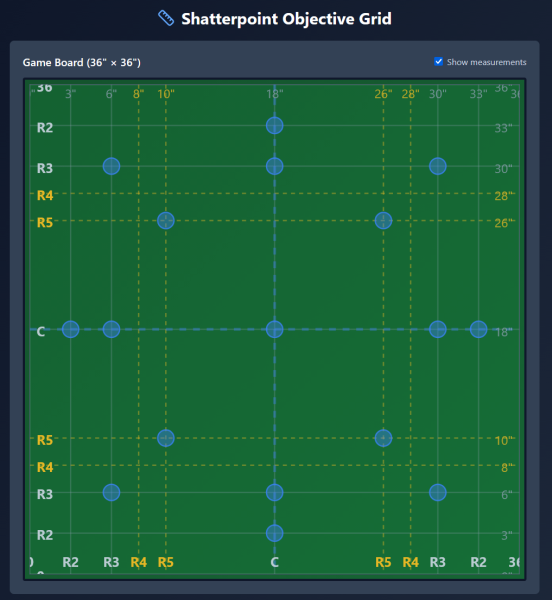
I do wonder if there shouldn’t be more options for objectives near the center axis of the board.related question : would this work for other games ?
Marvel Crisis Protocol would be a logical match, provided the same distances are used for objectives.December 17, 2025 at 2:55 am #1953930This would be especially useful if you’re using a mat with a pre-printed 1″ grid, but I’m not sure measuring the placement in inches would be faster than just using the range tools. Is that what you had in mind?
It should work fine for Never Tell Me the Odds, but possibly not for First Contact, which has some distances for a few of the objective points that combine the 3 and the 2 range, and a few placed at multiple 3 range increments. The product page for First Contact on AMG’s website shows the setup card: https://www.atomicmassgames.com/character/first-contact-mission-pack/
Hope that’s helpful!
December 17, 2025 at 5:03 pm #1954001My goal is to find a way that is faster than the range tools, but maybe that’s because I haven’t quite got the hang of reading the layouts yet.
The ‘first contact’ layout is one that I don’t quite understand.
I thought the maps were supposed to be square, but either the measurements are off or the distances are indeed identical.
upper left objective appears to be located ‘range 3’ from the left and only range 2 from the top?
or is there something specific with the ‘3’ that is shown ?December 17, 2025 at 5:29 pm #1954002It’s range 3 plus range 2 from the top. It’s important to note that range 3 plus range 2 does not equal range 5.
Weird, I know, but that’s proprietary measuring tools for you…
It’s also worth noting that the diagrams on the cards are often distorted a bit, so for example even though it looks like the top left objective is the same distance from the top as from the left on the card, when you follow the indicated measurements it won’t be.
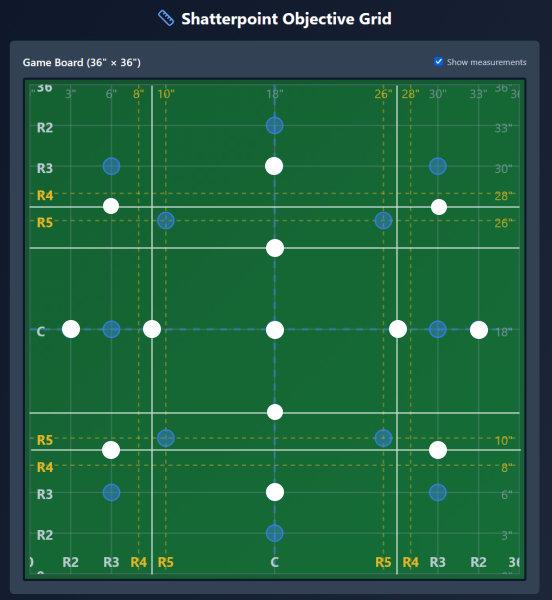
December 17, 2025 at 6:00 pm #1954003Here’s the First Contact layout overlaid on your grid. It looks like you would just need to add a few more guidelines to accommodate it.
 December 17, 2025 at 6:24 pm #1954005
The maps are distorted ? WTF
Time to get out the actual measuring sticks. I was *this* close to thinking I had it fixed.
Back to the drawing board it is I guess.Maybe a 1″ square reference grid isn’t such a bad idea.
Still need to find a way to integrate the range tool distances into this thing.I was hoping to have a simple basic grid that I could use to quickly setup objectives.
December 17, 2025 at 6:53 pm #1954006I think the idea is to make the cards as basic and graphic as possible, to make it easy to see which objectives are active. It can make setup a pain though, I definitely understand the problem you’re trying to solve. I feel bad for all the battlemat makers who tried to put out mats with the objective positions printed on them, only to have AMG keep releasing new mission packs with different patterns…
What I find difficult when setting up is making sure that there is enough variety as far as what elevation each objective is sitting on. The terrain wants to be placed at right angles, but only the objective pattern from the core box sits on a square grid, all the others are some variation of a hexagonal pattern. I wonder if any enterprising Etsy sellers are doing hex-based gantry terrain?
December 17, 2025 at 10:14 pm #1954012there’s no reason for anything to be on a grid pattern as far as terrain is concerned IMHO.
It’s not Halo / Deadzone …// —
I think the real issue is that the various combinations of these range tools create some hard to replicate/visualise distances.
As much as I hate to use inches at least that it is something I can measure reliably.
1 inch grid is would end up with too many intersections that would never ever be active.
Therefor I’m trying to find a middle ground.Maybe marking the layout for each map-variant so far is the only practical option?
That does mean working on a 1:1 scale version of a map, which is something I was hoping to avoid.But then … if things don’t go like they should then things need to be done as they are.
There’s always the chance that I can find a pattern once I’m done. -
AuthorPosts

 jeffersonpowers
You must be logged in to reply to this topic.