


![NO Weekender Or Cult Of Games XLBS This Weekend [Updated]](https://images.beastsofwar.com/2026/03/No_Weekender_and_XLBS_this_Weekend-225-127.jpg)




Home › Forums › Technical Support › Unable to watch vlogs or weekender xlbs


- This topic has 15 replies, 4 voices, and was last updated 7 years ago by
 caledor2.
-
AuthorPosts
-
March 24, 2019 at 8:58 am #1365754
Hey guys,
I have an issue with watching vlogs and the xlbs from today.
When I start the vlog it gives the loading circle and I can see the bar fill up but it doesn’t play.
When I skip a head in the part that has already been loaded I only see a grey screen.
This has only started from this week, I saw the xlbs show from last week (17 march) and I can still go back and watch it again.
I am watching from a PC and using firefox. I have already done a refresh of firefox but that didn’t help.
March 24, 2019 at 10:44 am #1365821Can’t confirm. All fine on my end. It may have been a temporary issue. Have you tried it again? Do you use proxies or a VPN?
March 24, 2019 at 12:34 pm #1365842Same here, Firefox on PC. I can watch stuff on twitch itself, but the VoD will not load, at all.
March 24, 2019 at 12:47 pm #1365847As far as I know I don’t use any proxies or VPN or it must be integrated with my protection.
I have tried watching it on the computer of my brother with my OTT account and it works there, I retried it again on my own pc and it doesn’t.
The strangest thing is that I can still watch the episode of last week or other vlogs from last week but if I try something from this week it doesn’t work.
March 24, 2019 at 2:35 pm #1365882@Shredhead Twitch VODs a something completly different from what @caledor2 was having trouble with.
@caledor2 have you tried a different browser on your PC? If it works with a different browser you should check if your firefox is up to date and clear cache. Also, disable adblocker plugins on BoW/OTT. I’ve experienced trouble with them here myself.
March 24, 2019 at 3:09 pm #1365888@sundancer No, both the VLOG and XLBS are twitch VoDs, and both do not play. Firefox updated yesterday, and I do not use other browsers.
March 24, 2019 at 4:34 pm #1365904Hi Guys,
Try lowering the video output quality by clicking the cog and selecting a lower video resolution e.g. 540p. That has helped others in the past experiencing similar issues in the past.
Tom
March 24, 2019 at 6:35 pm #1366030March 25, 2019 at 5:48 am #1366235@Shredhead XLBS is hosted on vimeo, not twitch. Also just try a different browser to see if that helps. If yes then we can look at solving the problem for the firefox. If it doesn’t we know to look elsewhere.
Assuming you’re using windows you also could use a tool called ccleaer to delete unwanted cache files. You can get it from here:
https://www.ccleaner.com/de-de/ccleaner/builds
And if you use the portable version nothing will be installed. You need to close firefox to use it correctly but the program will prompt you to do so if firefox is open.
March 25, 2019 at 1:53 pm #1366407Weird, I thought it’s twitch because the player looks so alike. Deleted the cache and the cookies, didn’t help. Videos on vimeo itself play fine. Can’t find anything with a websearch regarding firefox and vimeo embeds that’s younger than 2013. Oh well.
March 25, 2019 at 1:57 pm #1366409I had trouble at home with YouTube, Twitch and vimeo and those where due to my ISP having… let’s say “some filters implemented to make their own streaming more attractive”. :S
March 25, 2019 at 6:15 pm #1366497@sundancer I have done the following things.
I cleared my history from firefox: didn’t help.
I used the ccleaner but that didn’t help.
I tried it on chrome it works there.
You have mentioned something about disable adblocker plugins on BoW/OTT, where can I find those?
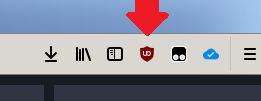
March 25, 2019 at 6:27 pm #1366498@caledor2 adblockers are not installed by default. If you didn’t install one then there won’t be one. If somebody else did it for you you’d have a (most times) red icon in the top right of your Firefox. A red stop sign with ADB in it (adblock plus) or a red shield (uBlock)
 March 25, 2019 at 6:30 pm #1366504
@sundancer No I haven’t any adblockers anymore as with every update of firefox he removes them and then I forget to add them again.
March 25, 2019 at 7:15 pm #1366510 -
AuthorPosts

 sundancer
 Shredhead
 tgu3
tgu3You must be logged in to reply to this topic.