















Help Us Improve Backstage Video Playback
June 15, 2014 by lloyd



For some website features, you will need a FREE account and for some others, you will need to join the Cult of Games.
Or if you have already joined the Cult of Games Log in now
What difference will having a FREE account make?
Setting up a Free account with OnTableTop unlocks a load of additional features and content (see below). You can then get involved with our Tabletop Gaming community, we are very helpful and keen to hear what you have to say. So Join Us Now!
Free Account Includes
- Creating your own project blogs.
- Rating and reviewing games using our innovative system.
- Commenting and ability to upvote.
- Posting in the forums.
- Unlocking of Achivments and collectin hobby xp
- Ability to add places like clubs and stores to our gaming database.
- Follow games, recommend games, use wishlist and mark what games you own.
- You will be able to add friends to your account.
What's the Cult of Games?
Once you have made a free account you can support the community by joing the Cult of Games. Joining the Cult allows you to use even more parts of the site and access to extra content. Check out some of the extra features below.
Cult of Games Membership Includes
- Reduced ads, for a better browsing experience (feature can be turned on or off in your profile).
- Access to The Cult of Games XLBS Sunday Show.
- Extra hobby videos about painting, terrain building etc.
- Exclusive interviews with the best game designers etc.
- Behind the scenes studio VLogs.
- Access to our live stream archives.
- Early access to our event tickets.
- Access to the CoG Greenroom.
- Access to the CoG Chamber of Commerce.
- Access the CoG Bazarr Trading Forum.
- Create and Edit Records for Games, Companies and Professionals.





























windows 7 no problem.
Ipad 4 ios 7.1.1 no problem.
Windows was chrome
Ios was safari
Ipad as above, yup works no problem 🙂
iPhone 5 IOS 7.1.1 also worked a treat 🙂
Win 7 (64 bit) using Opera 22 – fine (This morning’s XLBS was a bit jittery in comparison.)
Win 7 (64 bit) using Version 35.0.1916.153 – fine..
Samsung 4 Mini default browser – fine..
Will be able to test my Linux machine and a few other browsers tomorrow.
Retested with higher resolution..
Windows 7 (64bit) with Opera 22 and latest Chrome browsers – No issue,
Samsung S4 Mini (running Android 4.2.2), tetsed with Samusung and Chrome Browsers – No issue.
Correction – Full screen was a bit jittery in Opera 22, otherwise okay.
Windows 7: Chrome – Worked Fine
HTC Desire running android 2.2.2: Couldn’t play.
Works with OSX Chrome and Safari, and on Android (Chrome and Internet on HTC One).
Windows 7 64 bit… Internet Explorer – Plays fine but full screen doesn’t work properly. It only fills the browser.
Window 7 64 bit… Firefox – No problems at all.
Galaxy note 3… Built in browser – No problems at all.
iPod clean picture and good sound.
OSX 10.9.3
– Safari – All fine
– Chrome – Stops loading after 17 seconds of video. Version 36.0.1985.67 beta
Refreshing on chrome played it fine. Nothing to see here!
imac osx 10.9.3 – Safari 7.0.4 – fine
iphone 5 ios 7.1.1 – Safari – fine
ipad air ios 7.1.1 – Safari – fine
PC, Win7 64bit, Firefox 30 => All fine, infact one of the first backstage videos that runs without any issues.
As you mentioned, there are alot of issues with the other videos (atleast for me). Sometimes the complete screen went green. Going forward/backward usually crashed the flowplayer, a real pain.
This codec seems to be much better 🙂
iPhone 4s – IOS 7.1.1 Safari and Video Downloader – no problems
Windows Vista – working fine
Ubuntu (Linux) 13.04 – Google Chrome 34.0.1847.132 And Firefox 26.0 : Works perfectly fine in both. I’ll test it on other devices afterwards
I’d watch two complete weekenders and few other things from backstage. I have to say is a 100% better than the one before because it let me go fast forward pretty easy and since the page reload every time i comment ( and something i can’t hold it until the video ends ) it was a very much appreciated improvement!
Nokia 720 windows 8. Have to watch videos in a special browser
Google Nexus 7 2012 – android 4.4.2 and chrome browser
Samsung Galaxy SIII – android 4.3 and chrome browser
at the higher resolution the video still plays with problems on my android devices.
what are the problems 🙂 @heronimus2k
sorry for the typo, it should have been without problems. 🙁
Sorry fot the typo Warren.
I had meant to type “without any problems” but it my mind was quicker than my typing.
@warzan
Sorry for the typo Warren.
I had meant to type “without any problem”but it seems my mind was quicker than my typing.
PS is there an edit or delete option for forum posts like my previous two post on this subject, which are just horrible.
New video player is great but i cant re-watch any of the old ones now.
PC – Windows7 – Firefox : OK
Samsung Galaxy Tab 3 – Android 4.2.2 – Chrome : OK
LG/Google Nexus – Android 4.4.2 and 4.4.3 – Chrome : OK
Watched the video on –
iPhone 4s
Laptop w/ Windows 8 on Firefox
Not entirely sure what the actual players are but it worked fine on both. I also feel the cover photo to this story was a missed opportunity to show Lloyd playing noughts and crosses with his stuffed toys.
OSX 10.9.3 using Firefox works fine.
On Windows 8 and Windows 7 runs fine.
Galaxy Note 3 works with built in browser, Chrome, Dolphin and Firefox
Not working on my windows phone 🙁 used to
This is what comes up on my windows phone, [URL [/IMG][/URL]
Before it just had an option to play from flowplayer.
This even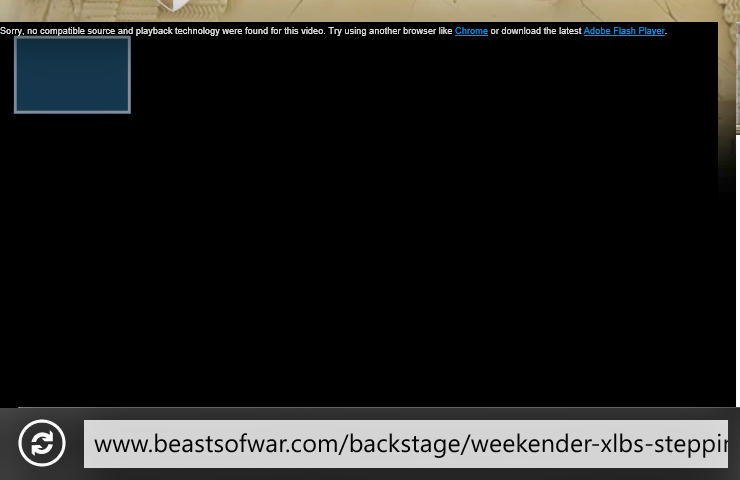
[URL [/IMG][/URL]
ASUS Memo 10 android tablet – 4.3 OS
Works with Chrome and Browser
Samsung Galaxy 4 phone 4.4 OS
Works with chrome
I will get there eventually!
Macbook Pro latest versions of Mavericks and Safari, all OK
Donated Samsung Galaxy II Android 2.3.4 – Worked Well!
PC with windows 8 running chrome works fine.
Ipad 2 with ios 7.1.1 running fine.
Nokia Windows phone 8.0 not working. Same problem as deaddave.
Try to tap and hold the vid, then select open in new tab.
Works perfectly on my Acer Aspire One 722, win7, 1.333ghz. I had problems with Flow player – it would skip every 20 seconds or so, with this new player you’ve at least ensured i will be renewing my backstage.
Sony Xperia J (ST26i) on Android 4.0.4 with Chrome
PC Windows 8.1 with Chrome. Worked on both.
Windows 7 laptop + (latest) Firefox = fine
Nexus 4 (latest Android) + Chrome = fine
At higher resolution:
Windows 7 laptop + (latest) Firefox = spinning disc of misery
Nexus 4 (latest Android) + Chrome = still fine
iPad with 7.1.1 fine
iPhone 4 with 7.1.1 fine
Windows 7 on laptop, using firefox.. works fine,
Glad to hear that it was not just me haveing problems with flowplayer…
Windows 7 Home Premium 64 bit
Firefox 29.0.1
Dual processor 2.1Gb 2.09 Gb Celeron
Download speed 1.54 Mb/s
Video plays but stopped for buffering at 0 seconds, 34 secs and 55 secs.
Just tried again. 2nd play through worked perfectly.
Worked fine on iPhone 5 iOS 7.1.1
Works on lenovo tablet running android 4.1.1. It didn’t run on this before so thanks!
Kindle Fire HD not loading as Flash is required.
Is flash even installed on the Kindle Fire HD?
I would love to see if we can get this working on kindle 🙂
Flash has stopped putting out updates for all of the mobile products. This is why the Kindle HDX doesn’t have Flash loaded at all and other versions and products have stopped getting updates.
New iPad mini no Problems . Version 7.1.1
Windows 7 64 bit – Firefox 29 – Fine
Windows 7 64 bit – Chrome 35 – Fine
Nexus 7 1st gen – Dolphin – Fine
Samsung S4 – Dolphin – Fine
Linux Mint 17 – Firefox – Fine
Samsung galaxy tab 2, works fine. Side note, can’t watch flowplayer stuff on this tablet though.
Windows 7 – Chrome Version 35.0.1916.153 – plays ok
Samsung Galaxy S3 – internet app – plays ok
Samsung Galaxy Tab 3 8.0 – Chrome app- Plays ok
Worked fine on kindle fire
Windows 7 x64, chrome – worked fine
Windows phone 8.0 – didn’t start, complained of “no compatible technology was found”
Samsung note 8, android 4.2.2 – worked fine
I believe Windows Phone 8.1 will fix this issue
Samsung Galaxy Ace 2 Android version 2.3.6
Samsung Galaxy Tab 2 Andoid version 4.2.2
Windows 98
All receiving Lloyd in glorious detail
Windows 8 using fire fox all I get is a spinning icon in the middle of the screen as of yet not tried on ipone or ipad
Samsung Galaxy I tablet Android 4.0.4. Google chrome and Dolphin browsers worked fine. Firefox (version 30.0) would not run it directly but when I selected the “Open in video player” option it ran.
All been tested with the increased resolution.
Windows 7 x64 IE10 worked fine. (when you expand the video,it only expands inside the browser)
Windows 7 x64 Chrome 35.0.1916.153 worked fine.
Nexus 7 4.4.2 Chrome Worked fine (backstage videos did not work before).
HTC Desire Android ver 2.2.2 (browser version webkit 3.1) does not work.
I can confirm an issue with Firefox on Windows
After Update…
Windows 7 64 bit… Internet Explorer – Plays fine but full screen doesn’t work properly. It only fills the browser.
Window 7 64 bit… Firefox – Spinning arrow icon.
Galaxy note 3… Built in browser – No problems at all.
Bugger. Warren beat me to it. lol
However. In Firefox right clicking allows me to “view video” and play it in media player with no problems. ( Bit it does a temporary download of the file before playing. )
Everything goes well with Windows 7 x64 Firefox, Explorer, Chrome. The HD is good
you’re using m4v for your encoded videos. Have you try h264 CBR5 or 8 with the Adobe Media Encoder ? A good one for quality and size.
In case it needs saying, can’t view on it Windows using Firefox.
Like some others, Windows 7 laptop firefox 29.0.1 is doomed. That circle just keeps spinning. Thought it was my bandwidth but I don’t seem to have a problem streaming other things and like Tasker I can “view video” and download it to play on media player, which I guess is a solution!
Nexus 10, android 4.4.3, chrome browser. Works fine
The issue with firefox was it doesn’t recognize a mime type in the header of the video file.
We are now manually setting that, and seems fixed on firefox. This also fixes an issue that had been reported to us over the last couple of weeks.
video/x-m4v = bad
video/mp4 = good
We will just manually set it from now on to make sure it plays correctly
Works for me now and I can confirm that Lloyd does indeed look more resolute!
Yup. Working on Win/FF now
Windows 8 Surface 2. Video looks pristine!
My Kyocera Torque still says I need flash upgrade which wont work on this andtiod cone…
Try it now @trukdawg – your profile was set to ‘flash’ I have now changed that so lets see if that works. 🙂
Updated video:
Ipad/iphone IOS7.1.1 still working well 🙂
Hi Lloyd
All on OS X 10.9.3…
Safari 7.0.4 – Never really worked well. Broken audio for yourselves and other sites.
Google Chrome 35.0.1916.153 – Now working fine
Firefox 29.0.1 – Now working fine
Cheers,
Brian
Hi Lloyd..thanks for the efforts you’re putting in to this. I have watched this video on all three of the devices I use: my PC (windows), my Galaxy Tab 3 (Android) and my Samsung Galaxy S3 smartphone (Android.)
No problem, Warren’s working on this too. Hopefully this will be it sorted going forward. Thanks for the help @hearne
works on google nexus (android)
Working fine on my iPhone 🙂 although it’s not the updated iOS (still running the 7.0.4 )
Windows 7 PC, never had a problem in the first place, the resolution is better on this new version thou.
Dinosaur alert: Plays fine on iPhone 3G 🙂
Didn’t used to.
Always worked great on my Windows 7 PC.
iPad 1 no problems.
New version works on Samsung Galaxy 4 – 4.4os in chrome
It’s not working too well on my desktop PC here thanks “brother Lloyd” but that’s more a problem with my rubbish interweb connection and the fact that Virgin Media can’t get their ar*es in gear and sort out a decent fibre optic broadband signal out where I live in Purley Surrey. It’s long overdue for me to switch to Sky or BT or some other provider, so I don’t end up like BoW Justin, with no hair ; lolz cause I’ve torn it all out fretting over why my PC is so grievously slow. (Sorry Justin: you know we all love ya really…honest. hehe)
Working on my kindle fire HDX.
Also fine on my Samsung phone, sgh-i727 running android 4.1.2
A big thank you!
OSX 10.9.3 using Firefox works fine at the higher resolution
windows 8.1 on google chrome works fine
Hi.
Has always worked find on my iPad, but had problems on my pc, where I only got a picture in full screen mode. this has now been cured.
keep up the good work.
Sony Experia Z1 works!
Update:
MacbookPro Mavericks 10.9.3 and safari 7.0.4; All still OK.
Update:
Tested older version of Mac OS X 10.7.5 on an iMac: works fine and looks really sharp on Safari as well as Firefox (since I downloaded the html5 plugin).
My BlackBerry Playbook – It won’t work on it. Grant it not many people have this tablet to matter much.
Yes. The Internet Explorer on XBox live will not play your videos. Thanks guys!
Working fine on HTC One Android and Windows Vista (cringe) with Chrome. This admittedly is in the office on a high speed wifi connection. I’ll check later at home on the slower connection where the Flowplayer video was stuttering whenever I tried to watch it. I have been downloading the mp4 for offline viewing to avoid this.
Confirming that it plays on Kindle HD
Sweet, works on my PS3 again 🙂
Although, I have to point out, it actually downloads the video to the ps3 hard drive and I play it back from there.
That would be really nice as an option for Kindle (don’t know if could happen) but would allow for some Backstage travel.
Tried to play the last two hobby lab videos on the PS3, they didn’t work, I’m assuming they are still using an older format/codec?
HI Dave, Yes that’s correct, it’s not a change we can just turn on for all vids unfortunately.
would that be something you can do at a later date? or is it not actually possible/practical to do?
Windows 8.1 on PC ~ Chrome – OK
Android 4.4 (Nexus 5) OK
Both give me the option to download the video for later viewing. Not sure if you intended this or not
Viewed this ok on kindle fire
Retest with higher resolution:
PC, Win7 64bit, Firefox 30 => All fine, works like a charm 🙂
Windows 7 64 bit – Firefox – Chrome working fine
kindle fire is fine
Windows 8.1, Firefox, Chrome and IE all fine.
Windows 8.1 RT, GUI IE working as well.
Excellent work guys thanks.
I have Windows 7 on Laptop and desktop using google chrome internet browser. The videos and this video works really well on the google chrome browser even when I full screen the video on my HDMI cable to my TV.
I don’t use anything else to play these videos or to use the internet.
early nexus 7 – android 4.2.1
Chrome – works fine and looks good
Firefox – getting a /MIME unsupported error
Pretty much the inverse of the old videos
I haven’t read all the comments, but I am watching excellent video output on my MacBook Pro using Safari 6.1.3
Well done guys
Works fine on galaxy note 10.1
Works well on Chrome windows 7 64 bit latest updates on both
Works on
Samsung Galaxy Note 2 (android 4.3)
Samsung Galaxy Note 10.1 (android 4.1.2)
nexus 7 (android 4.4.2)
Which is a vast improvement from never working in the past (even with the html 5 change) but once the screen is rotated its almost impossible to get out of full screen mode (the icons are hidden under the video).
I have to add I was using Chrome on all Android devices.
This is the BEST qualiy video I have ever watched on this site. I use Chrome.
Galaxy S4 worked perfectly using the default chrome browser!
Mozilla Firefox – Windows 8 – looked and worked perfectly. Best so far.
Really don’t like the volume control. It doesn’t appear until you play the video, at which point it slams out at full volume. You need to be quick or go deaf!
Ubuntu 13.10: Works fine on both Chrome and Firefox (latest vers)
iPhone3GS running iOS 6.1.6 (shut up) is also good
Laptop using Mozilla firefox no problems viewing here
This video works fine with Firefox (30.0) on a Mac running 10.6.8. However, I just tried to watch the Miniatures ER part 2 and it was really jumpy to start with until the entire video was downloaded and then about 5 minutes into the video it went green screen. I then have to reload the page and start the video again, etc.
Worked great on Apple Firefox!
PS4 internetbrowser wording fine.
Watching miniature ER on Ps4 on full screen. Works fine except for the green pixel errors and lines flashing across the screen.
full screen isant working in ie just goes full screen in browser and still get pop up alerts over vid and bottom chatrooms bar showing over be nice to have it full screen on monitor
Unfortunately I suspect that might be more to do with IE than our video… but… I will look into it!
I have updated the code, should work with IE 11 now 🙂 (May need to flush your cache possibly
iPhone 5c on iOS 7.1.1 with safari. Also plays back fine on gen2 Apple TV from iphobe with airplay. Also fine on gen 1 iPad on iOS 5.1.1. Also works sending to the sane gen 2 Apple TV from the 1st gen iPad.
Works fine on chromecast (chrome browser casting tab, fullscreening works too)
windows 7, chrome Version 35.0.1916.114 m through an hdmi out to 46″ tv. Works a charm. 🙂
Mac book air running Mavericks in chrome works great.
Note 3 running kit kat works great.
doesn’t seem to have a volume control or time line bar for me anymore : /
or the maximize view button
Windows 7 (patched up to date) on Laptop with chrome failed today (19/06/2014) reporting that the video used features that your browser didn’t support.
Windows 7 on laptop with Internet Explorer worked fine.
Android 4.4.2 on Nexus 7 – Chrome – format not supported
Android 4.4.2 on Nexus 7 – Photon Browser – format not supported
Android 4.4.2 on Nexus 7 – Firefox Browser – format not supported
Google Phone with Android 4.4.3 – Google Browser – Works Fine
Android 4.4.3 on Nexus 7 – Chrome for Mobile 35.0.1916.141- Works fine
I can’t watch any videos on backstage on my iPhone 5s
100% perfect on old MacBook Pro….Safari version 5.1.10, OS X 10.6.8